
Home › Deposit
Adding funds to your Lucky 97 account should feel simple, quick and predictable. This guide walks through every deposit route available inside the Lucky97 APK and mobile site — JazzCash, EasyPaisa, direct bank transfer and the USDT concept some players ask about — along with the exact numbered steps to follow, how to read your receipt or UTR, what to do when a deposit fails or sits pending, and how to keep your money safe from fake agents. Whether you just finished the register process or you are coming back after your first guide read-through, treat this page as your reference before you send any payment. Because Lucky 97 is a real-money entertainment platform, deposits are the gateway to everything else — the Teen Patti tables, the Andar Bahar and color prediction rooms, the slot reels and the daily bonus wheel — so getting the deposit step right the first time saves you frustration later.
Why the Deposit Step Matters
A deposit is not just a transfer of money; it is a small transaction with several checkpoints. The amount has to match what you intended to send, the receiving account details have to be the ones currently active inside the app (these can rotate), your network provider needs to process the request without timing out, and the platform's backend needs to reconcile your payment with your account ID. When any one of these links breaks, you get a delay, a mismatch, or in rare cases a failed transaction that needs manual follow-up. Understanding the mechanics behind a Lucky 97 deposit — rather than blindly following an outdated screenshot from a friend — is the single best way to avoid losing time or, worse, sending money to the wrong place.
This is also why we recommend reading through the entire page once before your very first deposit, particularly the sections on receipt handling, fake agents, and the comparison table of payment routes below. A five-minute read can save you from a stressful hour of chasing a stuck transaction.
Payment Routes Available for Lucky 97 Deposits
Lucky 97 supports several deposit routes so that players across Pakistan, regardless of which bank or wallet they use daily, can top up conveniently. The most common are JazzCash and EasyPaisa mobile wallet transfers, followed by direct bank transfer (IBFT or over-the-counter), and for some players the USDT digital-asset concept as an alternative when local rails are congested.
JazzCash Deposits
JazzCash is one of the most widely used mobile wallets in Pakistan, and it is typically the quickest way to fund your Lucky 97 balance. After selecting JazzCash on the deposit screen, the app generates a receiving account number and reference code tied to your session. You then open your JazzCash app, choose "Send Money" or "Mobile Account Transfer," enter the exact amount and account number shown, and complete the transfer with your JazzCash MPIN. Because JazzCash transfers are usually instant, your Lucky 97 balance often updates within a minute or two once the transaction clears.
EasyPaisa Deposits
EasyPaisa works almost identically to JazzCash. Select EasyPaisa from the deposit menu, note the account details and reference generated for your session, then use your EasyPaisa app or dial the USSD shortcut to send funds. EasyPaisa deposits are also normally quick, though during peak hours — evenings and weekends tend to see heavier wallet traffic — you may notice a short delay before confirmation.
Bank Transfer
If you prefer using your bank account directly, the deposit screen offers a bank transfer option, usually through Interbank Fund Transfer (IBFT) or by visiting a branch for an over-the-counter deposit. Bank transfers can take longer to reflect than mobile wallet transfers, particularly outside standard banking hours, on weekends, or during public holidays when interbank settlement slows down. If you choose this route, always double check the account title matches what is displayed in the app before confirming the transfer in your banking app.
The USDT Concept
USDT (Tether) is a stablecoin, a type of digital currency designed to hold a value close to one US dollar. Some players explore USDT as an alternative deposit concept when local wallet or bank rails are slow, unavailable, or when they already hold digital assets in an exchange wallet. Using USDT requires a compatible crypto wallet, an understanding of network fees, and extremely careful verification of the receiving wallet address, since blockchain transfers cannot be reversed once confirmed. If you are new to digital assets, treat this route with caution and only use it after you fully understand wallet addresses, network selection and transaction confirmations — a single mistyped character in an address can send funds somewhere unrecoverable.
Note: Deposit account numbers, reference codes and minimum or maximum limits are generated dynamically inside your session and can change over time. Always use the details shown on your current screen rather than numbers saved from a previous visit or shared by another person.
Comparison of Lucky 97 Deposit Routes
| Route | Typical Speed | Best For | Things to Check |
|---|---|---|---|
| JazzCash | Usually within minutes | Everyday quick top-ups | Exact account number and amount match |
| EasyPaisa | Usually within minutes | Players without a JazzCash wallet | Network delay during peak hours |
| Bank Transfer (IBFT) | Minutes to a few hours | Larger transfers from a bank account | Banking hours, holidays, correct title |
| Bank Transfer (Over-the-counter) | Same day, branch dependent | Players without online banking | Keep the stamped deposit slip |
| USDT (concept) | Depends on blockchain network | Players already using crypto wallets | Correct address, correct network, no reversals |
First Deposit Promotion
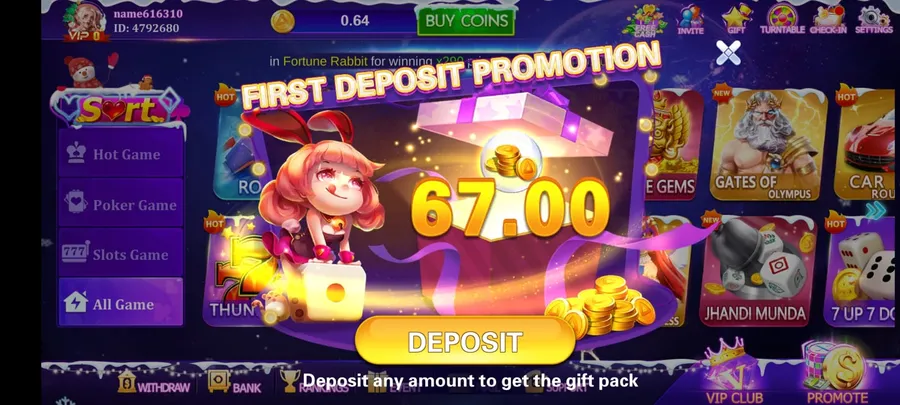
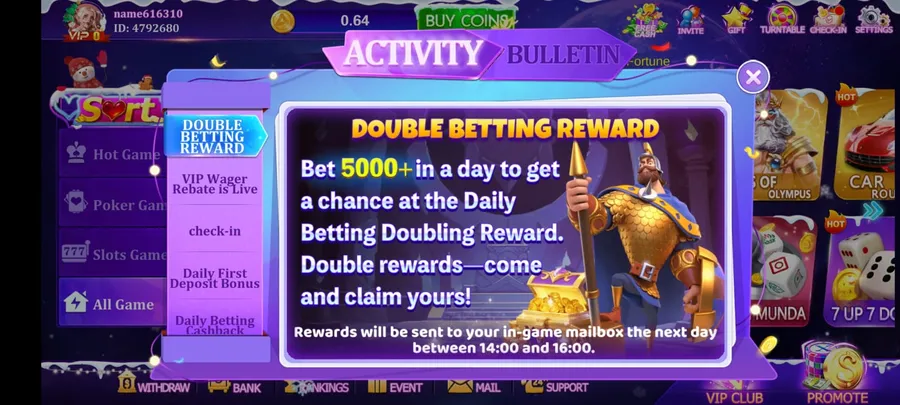
New accounts on Lucky 97 commonly see a first deposit promotion presented as a popup or banner shortly after registration. These promotions are designed to reward players who fund their account for the first time, often with a percentage-based bonus or a fixed reward tied to a minimum deposit amount. The exact numbers, thresholds and validity windows are shown on your screen at the time and can change, so never rely on a screenshot from months ago — read the terms displayed to you right now before opting in.
Below is an example of what a first deposit promotion screen and an activity bulletin might look like inside the app, so you know roughly what to expect and can compare it against what you see on your own device.
How Bonus Terms Generally Work
Deposit-linked bonuses on real-money platforms, including Lucky 97, typically come with conditions attached rather than being free-to-withdraw cash the moment they land in your balance. While the exact figures displayed to you can change, the general structure usually includes the following ideas:
- Minimum deposit threshold — you often need to deposit at least a certain amount for the promotion to trigger.
- Turnover or wagering requirement — bonus funds, and sometimes the deposit itself, may need to be wagered a set number of times before any related winnings become withdrawable.
- Validity window — promotions usually expire after a stated number of hours or days, after which unused bonus amounts may be removed.
- Game restrictions — not every game room may count equally toward turnover requirements; some contribute fully while others contribute a reduced percentage.
- One bonus per account or household — most platforms restrict promotional offers to a single account to prevent abuse.
Always open the full terms link or details panel attached to any promotion before you deposit, so you know exactly what is expected of you and there are no surprises when you later try to withdraw. If you are unsure how withdrawals interact with bonus turnover, our withdrawall page explains the process in more detail.
Step-by-Step: How to Make a Lucky 97 Deposit
- Log in to your account. Open the Lucky97 APK or the mobile site and sign in with the credentials you set during register.
- Open the Deposit section. Tap the wallet icon or the "Deposit" button, usually found on the home screen or account dashboard.
- Choose your payment route. Select JazzCash, EasyPaisa, bank transfer, or USDT depending on which method suits you best.
- Enter the deposit amount. Type the amount you want to add, making sure it meets any minimum shown on screen.
- Copy the receiving details. Note the account number, account title and reference code generated for your session — do not use old saved details.
- Switch to your payment app. Open JazzCash, EasyPaisa, or your banking app and start a new transfer to the exact details you just copied.
- Confirm the amount matches exactly. Sending a different amount than what you entered on the deposit screen can delay reconciliation.
- Complete the transfer. Authorize the payment with your MPIN, banking PIN, or wallet confirmation.
- Save your receipt or UTR number. Screenshot the confirmation screen immediately, before closing the payment app.
- Return to Lucky 97 and submit proof if requested. Some routes ask you to paste the UTR or upload the receipt to speed up confirmation.
- Wait for balance confirmation. Check your Lucky 97 wallet balance; most deposits reflect within a few minutes.
- Contact support if it does not appear. If your balance has not updated after a reasonable wait, reach out with your receipt and reference number ready.
Understanding Your Receipt and UTR Number
Every successful transfer, whether through JazzCash, EasyPaisa or a bank, produces some form of proof: a receipt screen, an SMS confirmation, or a Unique Transaction Reference (UTR) number for bank transfers. This proof is your record that money left your account and is the single most useful piece of information if you ever need to dispute or trace a deposit.
Get into the habit of doing the following every time:
- Screenshot the confirmation screen the moment the transfer completes, before the app can time out or refresh.
- Note the exact date, time, amount and reference/UTR number in one place, such as a notes app.
- Keep the screenshot until your Lucky 97 balance has clearly updated to reflect the deposit — do not delete it early.
- If your bank sends an SMS confirmation, keep that message rather than deleting it immediately.
- For over-the-counter bank deposits, keep the physical stamped slip until the transaction is confirmed online.
If you ever contact support about a missing deposit, having the amount, timestamp, sender account, receiving account and UTR ready will make the process dramatically faster than trying to explain from memory.
Failed or Pending Deposit: How to Fix It
Occasionally a deposit does not go through cleanly. Understanding the difference between "failed" and "pending" helps you respond correctly instead of panicking or resending money unnecessarily.
If Your Deposit Shows Pending
- Wait at least five to ten minutes — many pending transactions clear on their own once the network catches up.
- Avoid resending the same amount to the same account while it is still pending; duplicate transfers are harder to reconcile.
- Refresh your Lucky 97 wallet page or restart the app to force a balance check.
- Keep your receipt or UTR visible and ready in case support asks for it.
- Contact support with the exact time, amount and reference if the pending status does not clear within a reasonable window.
If Your Deposit Fails Outright
- Check whether the amount sent matches exactly what was requested on the deposit screen.
- Confirm you used the account details generated for your current session, not an old or shared one.
- Check your payment app's own transaction history to see if the money actually left your account.
- If the money left your account but never appeared, contact support with your receipt as proof rather than assuming it is lost.
- If the money never left your account, simply retry the deposit using freshly generated details.
Common causes of failed or delayed deposits include a mismatched account name, mistyped amount, temporary wallet network downtime, an expired deposit page that was left open too long, or accidentally using outdated account details from a previous session or from someone else's screenshot.
Budget before you deposit. Only deposit money you can comfortably afford to lose, and never treat deposits as a way to recover previous losses. Set yourself a fixed spending limit for the week or month, stick to it regardless of how a session is going, and take a break if you notice you are depositing more frequently than planned. Real-money games are entertainment, not a source of income, and responsible spending habits protect both your finances and your enjoyment of the game.
Practical Budgeting Tips
Building a simple personal rule set before you make your first deposit goes a long way toward keeping the experience enjoyable rather than stressful. Consider the following habits:
- Set a session limit. Decide the maximum amount you are willing to deposit in a single day before you open the app.
- Separate entertainment money from essential funds. Never deposit money that is earmarked for bills, rent, or other obligations.
- Track your deposits. Keep a simple running total for the week or month so you always know where you stand.
- Avoid chasing losses. If a session goes badly, resist the urge to deposit more in an attempt to win it back immediately.
- Take regular breaks. Stepping away between sessions helps you make clearer decisions about whether to continue.
- Review your habits periodically. If deposits are becoming more frequent or larger than planned, treat that as a signal to pause and reassess.
Security Tips: Avoiding Fake Agents and Scams
As with any platform that involves real-money transfers, fraudulent actors sometimes try to impersonate official channels to trick players into sending money to the wrong place. Protecting yourself is mostly a matter of habit and healthy skepticism:
- Only use deposit details shown inside your own app session. Never send money to an account number shared in a chat group, comment section, or by a stranger claiming to help you deposit faster.
- Never share your One-Time Password (OTP) or MPIN. No genuine support representative will ever need your OTP, MPIN, or full password to process a deposit.
- Be wary of unsolicited messages. If someone contacts you first claiming to be from Lucky 97 offering deposit "help" or bonus codes, treat it as a red flag.
- Double check account titles. Before transferring, verify the receiving account title matches what is expected rather than trusting the number alone.
- Avoid third-party "top-up" middlemen. Routing your deposit through someone else's personal account instead of the details generated in-app removes your ability to trace or dispute the transfer.
- Keep your login credentials private. Do not let anyone else deposit "on your behalf" using your account, since this removes your control over the process.
- Report suspicious contact. If you encounter anyone impersonating support or offering unofficial deposit shortcuts, avoid engaging and report it through official support channels.
Rule of thumb: if a deposit "shortcut" sounds faster or cheaper than the official in-app flow, it is almost always riskier, not better.
Deposit Limits and Currency
Minimum and maximum deposit limits vary by payment route and are displayed directly on the deposit screen at the time you initiate a transfer. These limits exist partly for security and partly to keep transaction processing smooth across JazzCash, EasyPaisa, and banking networks. Always check the current figures shown to you rather than assuming they match what you saw previously, since operators periodically adjust limits based on network conditions. All amounts inside the app are handled in Pakistani Rupees (PKR) for local routes, while the USDT concept naturally operates in stablecoin units that you would then see converted inside your wallet.
After Your Deposit: What's Next
Once your balance updates, you are ready to explore the game lobby, which includes Teen Patti, 3 Patti variations, Andar Bahar, color prediction rooms, slot titles like Fortune Gems and Gates of Olympus, and fast round games such as Dragon vs Tiger and 7 Up 7 Down. If you have not yet installed the app on your device, our install page walks through setup on Android, and the download-for-ios page covers the iOS process. New players who want a broader orientation before diving in should also read the main guide, which covers gameplay basics alongside deposit and withdrawal fundamentals.
Frequently Asked Questions
What is the fastest way to deposit into Lucky 97?
For most players in Pakistan, JazzCash and EasyPaisa mobile wallet transfers are the fastest routes because they settle in minutes when the details are entered correctly and the account name matches.
Can I deposit using a bank transfer?
Yes, bank transfer through IBFT or over-the-counter deposit is available on the deposit page. It can take longer to reflect than wallet transfers, especially outside banking hours or on public holidays.
What is USDT and why would I use it for deposits?
USDT is a stable digital currency pegged to the US dollar. Some players use it as an alternative deposit concept when wallet or bank routes are congested, but it requires a compatible wallet and careful address verification.
Is there a first deposit promotion?
New accounts commonly see a first deposit promotion banner inside the app. Read the exact terms shown on your screen, since promotions and thresholds can change without notice.
What should I do if my deposit is stuck pending?
Wait a few minutes, avoid resubmitting the same transaction, keep your receipt or UTR number ready, and contact support with the transaction reference if the balance does not update.
Why did my deposit fail?
Common causes include mismatched account names, incorrect amount entry, network wallet downtime, expired session pages, or entering an old deposit account that has since changed.
Do I need to keep my deposit receipt?
Yes. Always screenshot or save the receipt and UTR/transaction ID until the balance is confirmed in your Lucky 97 wallet, since support may ask for it to resolve disputes.
Are there deposit bonus terms I should know?
Bonus terms generally include a turnover or wagering requirement before funds can be withdrawn, minimum deposit thresholds, and validity windows. Always read the in-app terms before opting in.
How do I avoid fake agents when depositing?
Only use payment details generated inside the official app session, never send money to accounts shared in chat groups or by strangers claiming to be agents, and never share your One-Time Password.
Is there a minimum or maximum deposit limit?
Limits vary by payment route and are displayed on the deposit screen at the time of transfer. Check the current minimum and maximum shown in the app before sending funds.